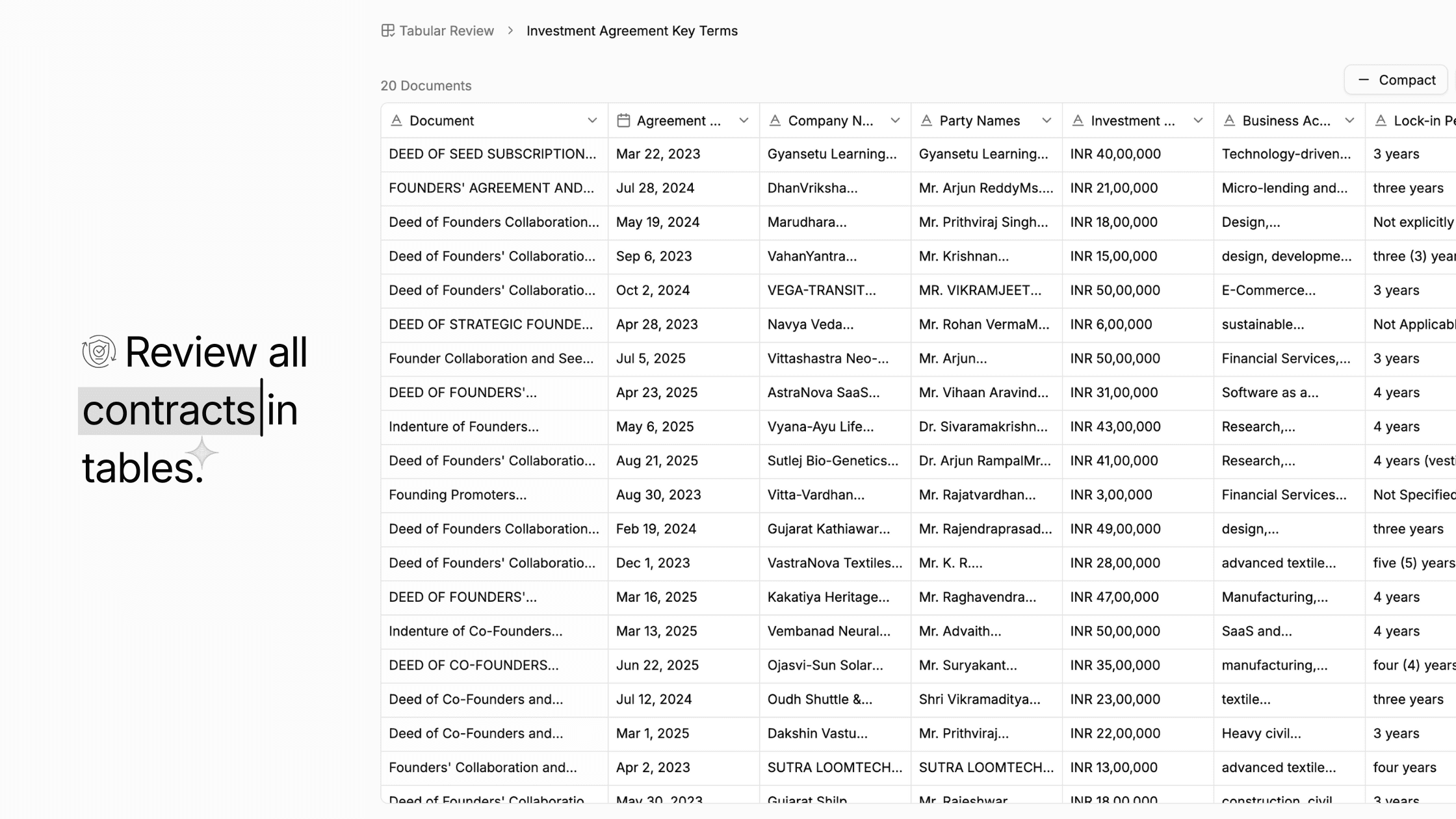
For weeks, we’ve been getting the same request from our users:
Can LawSimpl help me review documents in a structured table?
For example, can it extract the party names, clause summaries, key dates, and potential risks side-by-side for quick comparison?
So, we listened and built exactly what they wanted.
Today, we’re finally launching Tabular Review.
A simpler way to turn hundreds of documents into an organised table on which your team can rely.
No endless scrolling. No copy-pasting. No Excel complexities.
How does ‘Tabular Review’ work?
The process is quick and simple:
Upload a document (PDF, Word, Scanned files — all supported)
Create your own columns
→ e.g., Clause Number, Party Name, Renewal Date, Risk, SummaryAdd prompts to each column
LawSimpl extracts everything for you
You review it but in a tabular form
Download the report in CSV/Excel
It delivers the precision of due diligence, only faster. Think of it as a more user-friendly version of Excel, but exclusively for legal work.
Why did we build it?
Legal teams do not struggle with understanding documents; it’s having the time to get through them.
With hundreds of documents to review under tight deadlines, legal teams are actively seeking a smart assistant that can efficiently handle tasks such as extracting dates, clauses, penalties, and more. Work that involves real data extraction, rather than legal analysis, and on which teams spend hours flipping through page after page.
So the idea was simple:
What if LawSimpl did the reading and extraction? And you only focus on review and analysis?
That’s the whole spirit of Tabular Review.
Where does it really shine?
Scenario | How It Helps |
|---|---|
Contract review | Extract key clauses and deadlines |
Due diligence | Compare multiple agreements in one table |
Litigation | Organise issues, parties, judgments |
Compliance work | Track regulatory requirements |
HR & employment | Create agreement trackers quickly |
You just have to define the table structure, and LawSimpl will organise it accordingly.
Prompts make it powerful
Each column uses its own AI prompt. Here are the examples that work really well:
Column | Prompt |
|---|---|
Risk | “Find any clause that imposes liability or penalty.” |
Party Name | “Extract all parties involved in the agreement.” |
Clause Summary | “Summarise this clause in simple English.” |
Renewal Date | “Extract renewal or termination details.” |
Once you save these, you can reuse the same structure across documents.
Export, Share, Collaborate
When you're done, you can:
Export to Excel/CSV
Share with a client or team
Keep editing inside LawSimpl
Built Because You Asked
Before we started building on this feature, users highlighted a few challenges that ultimately inspired this feature:
“I love the AI review, but I need it structured.”
“My clients always ask for summary sheets.”
“Excel extraction eats up half my day.”
We didn’t guess what legal teams needed; we listened. Tabular Review was born from real conversations with users who wanted a faster, clearer, and more structured way to work.
The next time you open a 50-page contract, try looking at it in table form first. It might change how you review documents forever.
Try it now with just a click!
Next on the Lineup: Our Upcoming Feature
Our next release is designed to take your workflow one step further. Here’s what’s coming:
Auto-generate drafts from the table itself.
Reviewing multiple documents side by side.
Imagine comparing 10 agreements in one table or generating the drafts from the table itself. These features are in the final stage of preparation, and we will be launching them shortly.
Stay tuned as we can’t wait for you to try them!